








How to Deposit on A9play Malaysia – Top Up & Payment Guide
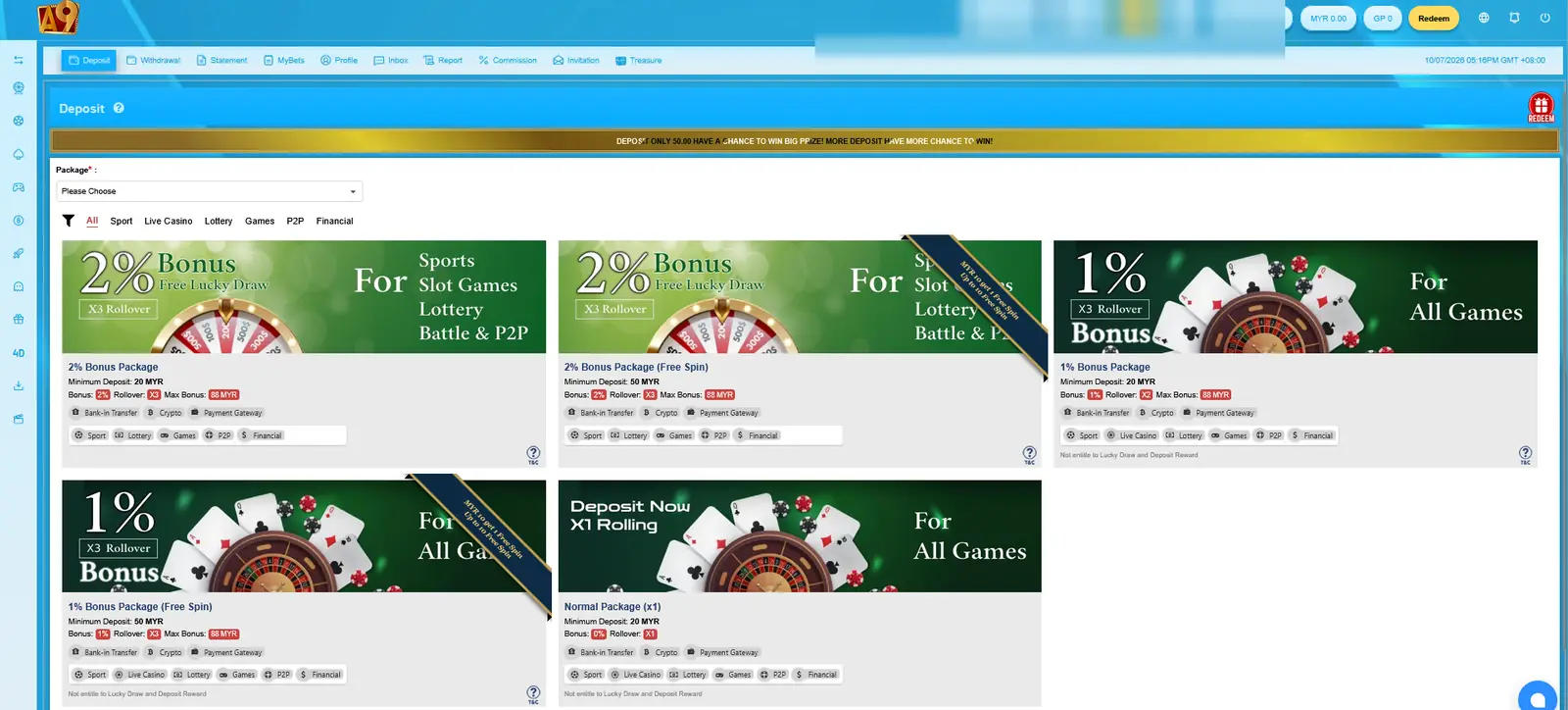
Adding funds to an A9play account starts inside the Deposit area after login. The Malaysia interface we reviewed showed different deposit packages rather than one universal deposit option, so the amount, bonus and rollover can depend on the package you choose.
The deposit screen also grouped payment access into options such as Bank-in Transfer, Crypto and Payment Gateway. What appears in your own account can change, so check the live cashier before sending money.
Before You Deposit
Do not start with the bonus percentage alone. First check the package card and make sure it matches how you intend to use the account.
These are the main details worth checking:
- Minimum deposit amount
- Bonus percentage
- Maximum bonus
- Rollover or rolling requirement
- Eligible game categories
- Lucky Draw or Free Spin eligibility
- Available payment method
- Account currency
A package with a larger bonus can also have a different rollover requirement, so the biggest percentage is not automatically the most suitable choice.
A9play Deposit Packages We Reviewed
The Malaysia deposit screen showed several package choices. The examples visible during our review included:
| Package | Minimum | Bonus | Rollover | Maximum Bonus |
|---|---|---|---|---|
| 2% Standard | 20 MYR | 2% | X3 | 88 MYR |
| 2% Free Spin | 50 MYR | 2% | X3 | 88 MYR |
| 1% Standard | 20 MYR | 1% | Check live terms | 88 MYR |
| 1% Free Spin | 50 MYR | 1% | X3 | 88 MYR |
| Normal Package | 20 MYR | 0% | X1 | No bonus |
The 1% package information appeared inconsistent between the available artwork and package details, so we recommend checking the live card instead of assuming a fixed rollover value.
For a fuller comparison of bonus conditions, see our deposit bonus and reward guide.
How to Add Funds to Your A9play Account
- Sign in to your account. Open the member area using your normal User ID or mobile-number login.
- Open Deposit. Go to the Deposit or cashier area shown inside the account.
- Select a package. Compare the minimum deposit, bonus and rollover before choosing one.
- Choose a payment method. Use one of the methods currently displayed for your account.
- Check the payment details. Confirm the amount, account information and any instructions shown before sending funds.
- Complete the payment. Follow the payment steps shown on screen.
- Check your account status. Wait for the balance or transaction record to update before attempting the same payment again.
Which Deposit Methods Were Shown?
The reviewed deposit interface grouped payment options into areas such as:
- Bank-in Transfer
- Crypto
- Payment Gateway
Individual gateway names or bank details can change. Always use the details displayed inside the current deposit screen rather than an account number copied from an old screenshot, social post or private message.
Bank-in Transfer
If Bank-in Transfer is available, check the receiving account information carefully before making the transfer. The account or bank details shown in the cashier can change, so saving an old payment destination for future deposits is not always a good idea.
After transferring, follow any confirmation or submission steps shown by the platform. Keep your transaction reference until the balance has been updated.
Crypto Deposit
If Crypto appears as a deposit option, confirm both the wallet address and the required network before sending funds.
Crypto networks are not automatically interchangeable. Sending an asset through the wrong network can create a transaction problem that A9play2u.com cannot reverse.
Do not send crypto to a wallet address supplied only through an unverified Telegram message or private chat.
Payment Gateway
Payment Gateway options can redirect users through another payment process. Before completing it, check the amount and destination shown on the payment screen.
If the gateway page looks different from what you expected, go back to the deposit area and verify that you opened it from the current account session.
Why the Package Matters Before You Pay
A9play’s reviewed deposit screen showed that package conditions can affect more than the bonus itself. Different offers can change the minimum deposit, rollover and reward eligibility.
This means two users depositing the same amount could have different conditions if they selected different packages.
Read the selected package one more time before sending money. Check the minimum amount, bonus, rollover and eligible game category rather than relying only on the package headline.
Can You Change the Package Later?
The deposit notice we reviewed indicated that changing an active package may require the existing rolling target or another related deposit condition to be completed first.
For that reason, it is better to choose the package carefully before making the payment instead of assuming you can immediately switch after depositing.
Large Deposit Notice
The reviewed interface also contained a notice for deposits of 10,000 or more, directing users to contact customer service regarding a special bank account.
Because the notice should be interpreted together with the current cashier and currency settings, confirm the amount and currency shown in your own account before acting on it.
What If the Deposit Does Not Appear?
If the balance does not update immediately, avoid sending the same payment again without checking the first transaction.
Start by reviewing:
- The payment status
- The amount transferred
- The selected package
- The bank, gateway or wallet destination
- The transaction or payment reference
- The time the payment was made
If the transaction still cannot be identified, use the support route provided by the external platform and keep the payment reference available. Do not send your password or OTP as part of a deposit enquiry.
Already Deposited and Want to Check Your Activity?
The account interface we reviewed also included a Statement area with fields such as Running Total, Total Outstanding, Activity, Net Win/Loss and Commission.
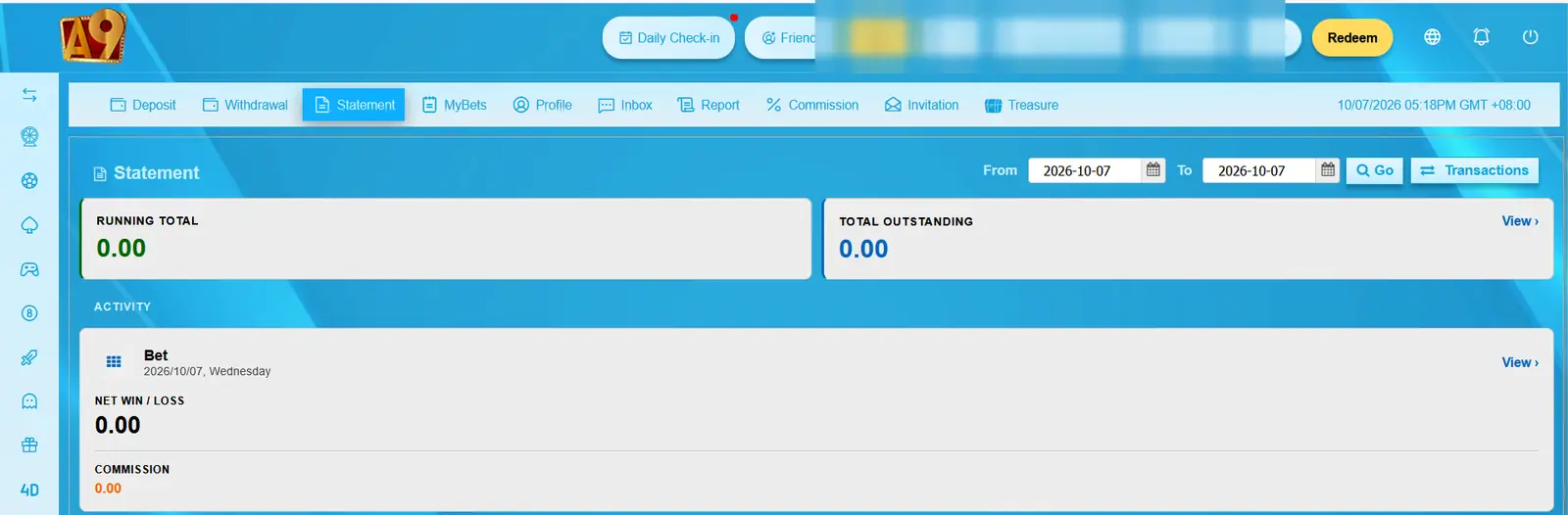
The Statement area can help you review account activity, but any account-specific payment dispute still needs to be handled by the external platform.
Need to Sign In First?
The Deposit area is part of the member account. If you cannot reach it because of a login problem, see our sign-in troubleshooting steps.
New users can first review the Malaysia account setup process before creating an account.
Thinking About a Withdrawal?
Deposit and withdrawal methods are not exactly the same. The withdrawal settings we reviewed included Bank, A9wallet/G2point, Touch’n Go and Crypto options.
When you are ready to review those settings, see our cash-out and withdrawal guide.
Deposit Safety Checklist
- Use payment details shown inside the current account.
- Check the currency and amount before transferring.
- Confirm the selected bonus package.
- Read any rollover requirement.
- Verify a crypto network before sending funds.
- Keep your transaction reference.
- Do not share your password or OTP.
- Do not send money to an unverified social-media or Telegram contact.
What We Verified
Our review confirms that the Malaysia deposit interface displayed multiple deposit packages with different minimum amounts, bonus percentages and rollover conditions, along with Bank-in Transfer, Crypto and Payment Gateway categories.
Payment destinations, gateway availability and package conditions can change. The current information displayed in your own account should therefore take priority over an older screenshot or guide.
A9play2u.com is an independent affiliate information website. We do not receive deposits, control player balances or approve payment transactions.