








How to Withdraw from A9play Malaysia – Methods & Request Guide
Withdrawing from A9play starts inside the member account, where the withdrawal area we reviewed showed several receiving options. These included Bank, A9wallet/G2point, Touch’n Go and Crypto.
Before submitting a request, check the method, receiving details and any conditions shown in your own account. Withdrawal settings can change, and information displayed on the live screen should take priority over an older guide or screenshot.
A9play Withdrawal Options Seen in the Account
The reviewed Malaysia account provided more than one withdrawal route. The right option depends on what is currently enabled for your account and where you want to receive the funds.
| Method | What We Saw | What to Check |
|---|---|---|
| Bank | Bank-account details with a limit of up to three saved accounts. | Account holder name, bank and account number. |
| A9wallet/G2point | A separate wallet withdrawal setting. | Correct wallet/account information. |
| Touch’n Go | A dedicated Touch’n Go withdrawal option. | Receiving details shown in your account. |
| Crypto | Ethereum and USDT wallet settings across several networks. | Wallet address and network must match. |
Withdrawing to a Bank Account
The Bank screen we reviewed allowed users to save up to three bank accounts. Fields included the name as shown on the bank account, bank or e-wallet selection, account number, branch information and a default-account option.
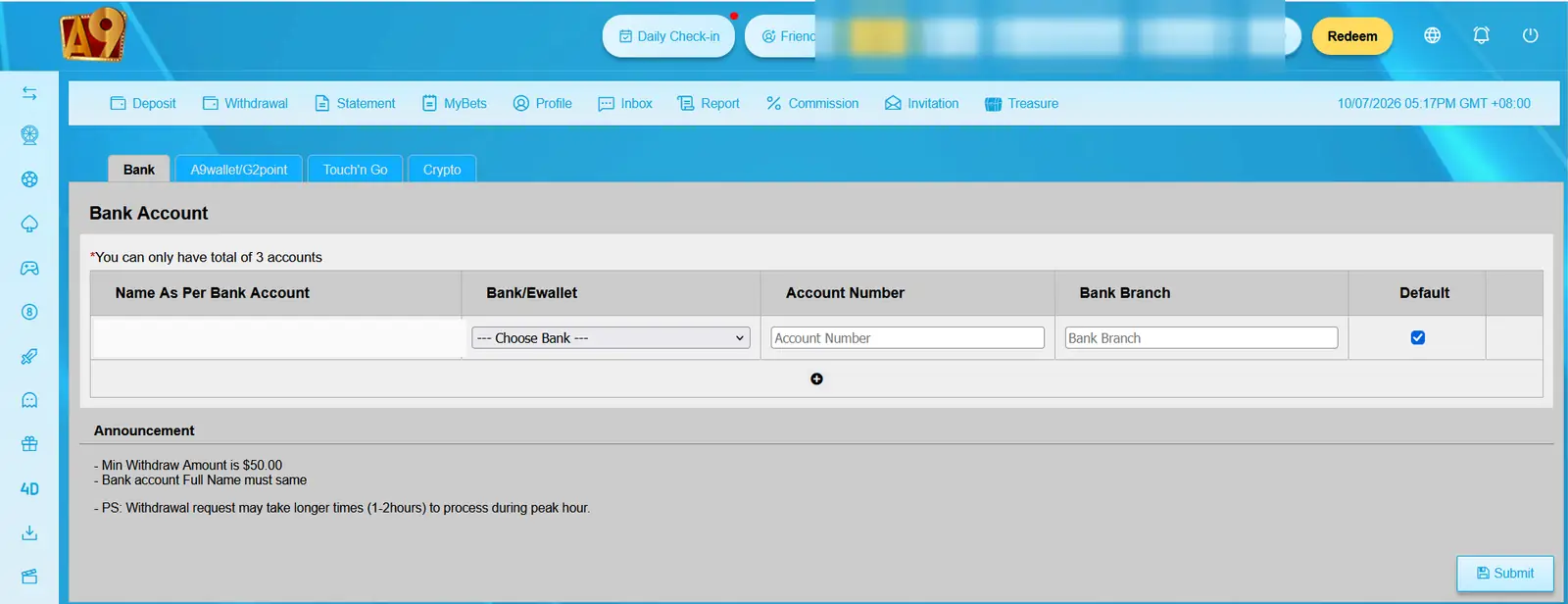
The screen also stated that the bank-account full name should match. This is important because a mismatch between the name used in the player account and the receiving bank details may cause additional checks.
Minimum Withdrawal Amount Shown
One notice on the withdrawal screen displayed:
“Min Withdraw Amount is $50.00”
However, the reviewed player account also displayed MYR as its account currency. Because the two labels are inconsistent, we do not convert or rewrite the amount as MYR.
Check the minimum amount and currency shown inside your own withdrawal screen before submitting a request. The displayed “$50.00” notice should not automatically be interpreted as 50 MYR.
How to Submit a Withdrawal Request
- Sign in to the member account. Use your normal account credentials and open the Withdrawal area.
- Choose a receiving method. Select Bank, A9wallet/G2point, Touch’n Go or Crypto if that option is currently available.
- Review the receiving details. Check the account name, bank details, wallet address or network before continuing.
- Check the amount. Confirm that the requested amount meets the current minimum and any account conditions.
- Submit once. Complete the request and wait for the status to update rather than immediately sending duplicate requests.
- Keep any reference information. A transaction reference or account history can be useful if you later need help with the request.
A9wallet and G2point Withdrawal
The account also showed a dedicated A9wallet/G2point withdrawal setting.
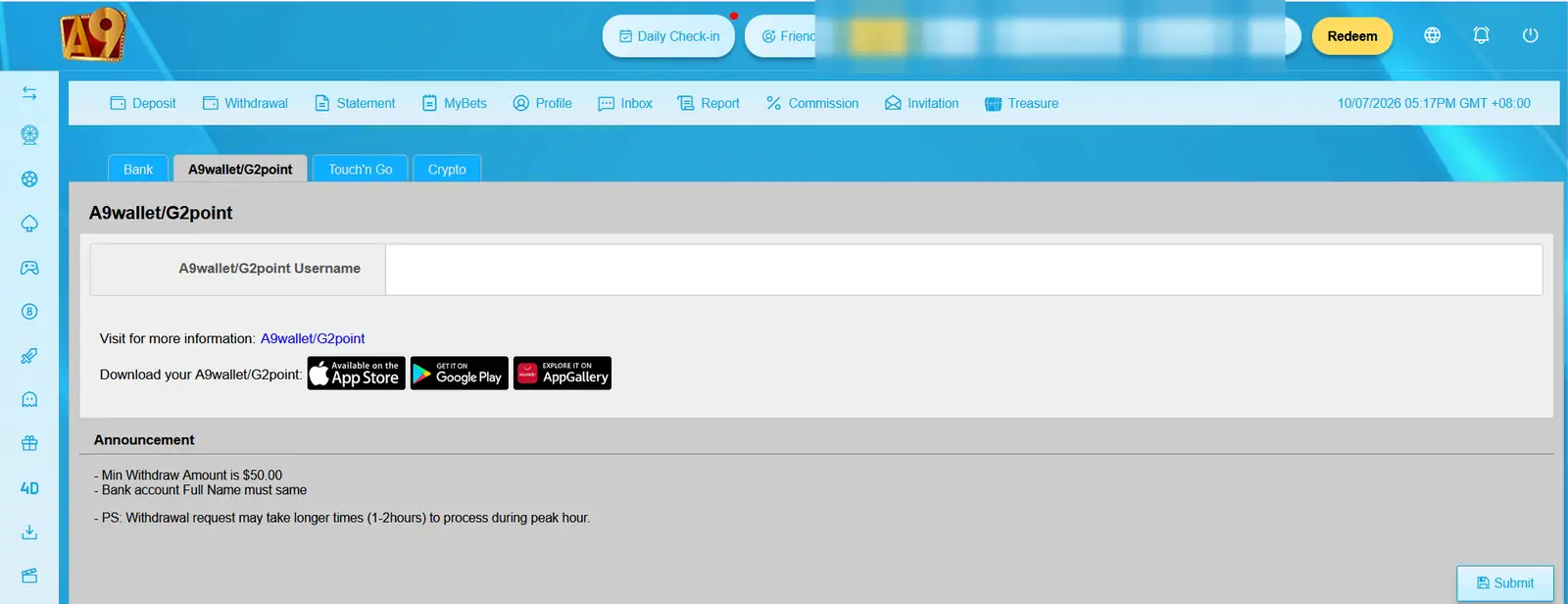
If this method is available in your account, use the receiving information requested by the live form. Do not assume that wallet details saved elsewhere will automatically apply here.
Touch’n Go Withdrawal
Touch’n Go appeared as another separate withdrawal option in the Malaysia account.
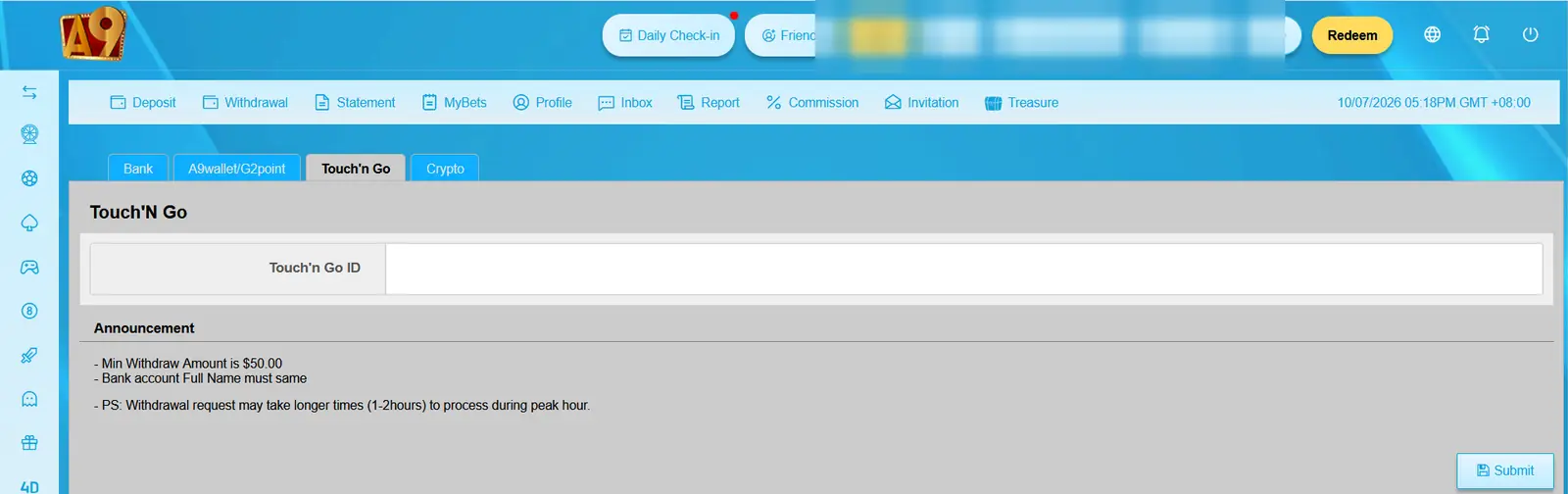
If you use this option, confirm the details requested on the current screen before submitting. A9play2u.com does not receive, verify or change those payment details.
Crypto Withdrawal and Network Selection
The Crypto settings we reviewed included Ethereum and USDT wallet fields for several networks:
- USDT ERC20
- USDT TRC20
- USDT BEP20
- USDT SOL
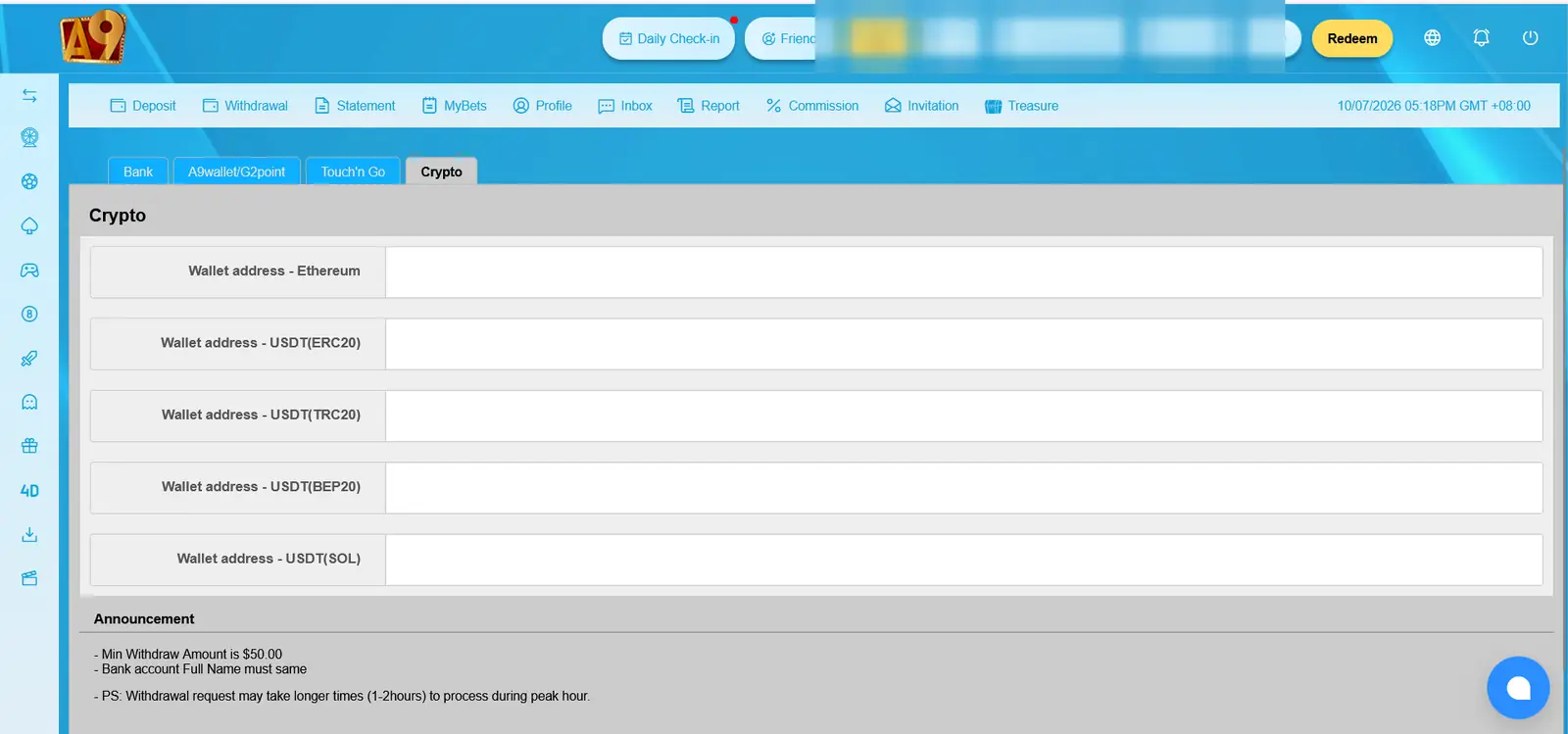
For crypto withdrawals, the wallet address and network need special attention. A USDT address for one network should not automatically be treated as suitable for another network.
Always compare the network selected in the withdrawal form with the network supported by the receiving wallet before submitting the request.
What About Withdrawal Processing Time?
The withdrawal screen contained a notice referring to a possible 1-2 hour delay during peak periods.
We treat that as wording shown in the interface, not as a promise that every withdrawal will complete within one or two hours. Processing can depend on the selected method, account checks, payment-provider conditions and other factors controlled by the external platform.
Why a Withdrawal May Need More Checking
If a request is not progressing as expected, check the account before sending another one. Useful things to review include:
- Whether the receiving information is correct
- Whether the bank-account name matches the required account information
- Whether the minimum withdrawal amount has been met
- Whether an active promotion still has a rollover requirement
- Whether the correct crypto network was selected
- Whether the request is already showing as pending
- Whether additional account verification is requested
Promotion Rollover Can Matter
If you used a bonus package when depositing, check whether its rollover requirement has been completed before expecting the balance to be available for withdrawal.
The packages we reviewed had different rolling conditions, and changing packages may also be subject to existing requirements.
If you are unsure which package rules apply, read our bonus and rollover explanation.
Do Not Submit the Same Request Repeatedly
If a withdrawal is already pending, repeatedly submitting new requests can make it harder to understand which transaction you are checking.
Keep the reference or transaction information from the existing request and check its status first. If the status remains unclear, contact the support route shown by the external platform.
If Your Withdrawal Is Delayed
When asking about a delayed transaction, useful information can include:
- Withdrawal method
- Requested amount
- Date and approximate time
- Transaction or reference number
- Current status shown in the account
Do not include your password, OTP, bank login password, crypto seed phrase or private key in a support message.
Check Your Account Activity
The reviewed member interface also contained a Statement area for account activity and a MyBets area for betting records. These screens can help you review what is recorded in the account before contacting support.
If you first need help getting into the account, see our login problem checklist.
Need to Deposit First?
The deposit and withdrawal screens use different settings. Deposit options we reviewed included Bank-in Transfer, Crypto and Payment Gateway categories, together with several bonus packages.
If you want to understand that side first, use our account top-up walkthrough.
Withdrawal Safety Checklist
- Use only the receiving method shown in your current account.
- Check the account holder name before using a bank account.
- Verify the crypto network as well as the wallet address.
- Review any remaining bonus rollover.
- Keep the transaction reference.
- Do not submit repeated requests while one is pending.
- Never share your password or OTP.
- Never share a crypto seed phrase or private key.
What We Verified
The account material we reviewed showed withdrawal settings for Bank, A9wallet/G2point, Touch’n Go and Crypto. The Bank area stated that up to three accounts could be saved, while the Crypto area displayed Ethereum and USDT network options.
We also observed a minimum-withdrawal notice displaying $50.00 and a separate peak-time notice referring to 1-2 hours. Because the account itself displayed MYR, users should verify the current currency, limit and processing information directly inside their own account.
A9play2u.com is an independent affiliate information website. We do not process withdrawals, approve requests, control transaction timing or have access to player balances.