








A9play Download Malaysia – Choose the Right Mobile Access
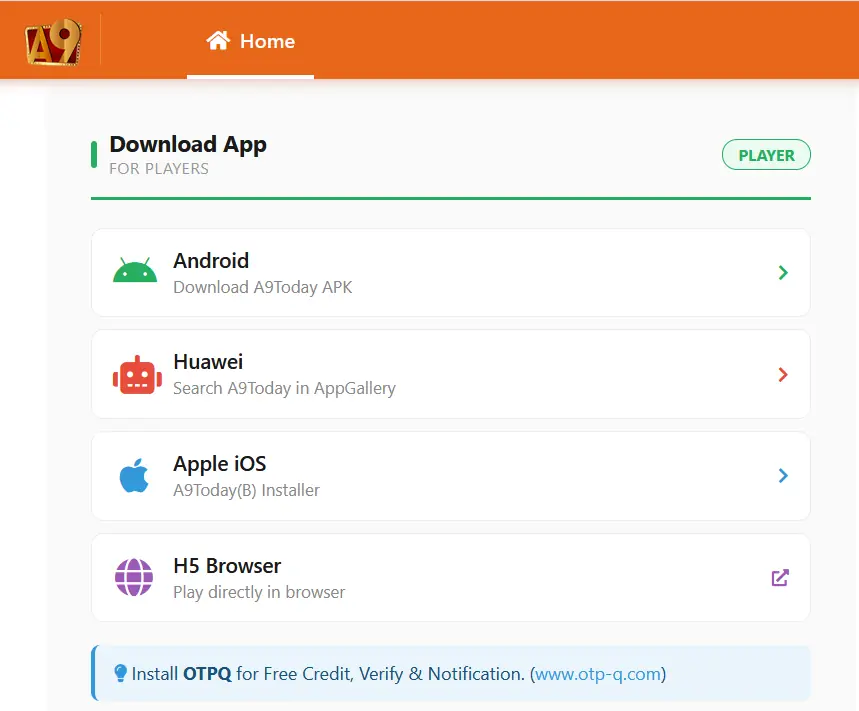
Looking for A9play on your phone? The access screen we reviewed gives players four ways to continue: Android, Huawei, Apple iOS and H5 Browser. You do not necessarily need to install an app, because browser access is also shown as an option.
One thing can be confusing at first: some download buttons use the name A9Today even though the wider account interface uses A9play branding. We keep those names exactly as they appeared on the screen instead of treating every installer name as identical.
Which A9play Access Option Should You Use?
The easiest choice depends on your device and whether you want to install anything.
- Android phone: use the Android download option shown on the current access screen.
- Huawei device: follow the Huawei option or the AppGallery instruction displayed there.
- iPhone or iPad: use the Apple iOS installation route currently provided.
- No installation: choose H5 Browser if you prefer to open the platform directly in a mobile browser.
Android Download
The Android option we checked displayed the wording “Download A9Today APK”. This is important because users searching for an A9play APK may notice a different name after opening the mobile access screen.
Before installing an APK, check the page you are downloading it from and review the filename or installation prompt on your own device. Android may ask for permission before an APK can be installed. Only change a device setting when you understand why that permission is required.
If the filename, destination or instructions look different from what you expected, do not continue simply because the page uses familiar A9play branding.
Using A9play on Huawei
The Huawei option in the interface we checked instructed users to search for A9Today in Huawei AppGallery.
Store availability can change. If the app does not appear on your device, return to the current mobile access page and check whether another Huawei option is being offered. An older download tutorial may no longer match the current AppGallery listing.
Apple iOS Access
The Apple option displayed the name “A9Today(B) Installer”. iOS distribution methods can change, so the instructions shown on the current access screen are more useful than following an old certificate or profile tutorial from another website.
If your iPhone or iPad asks you to approve a profile, certificate or device setting that is not explained in the current instructions, verify the step before continuing.
Prefer Not to Install an App? Use H5
The H5 option gives players a browser-based way to access the platform without installing an APK or iOS application.
It can also be useful when an app is unavailable for a particular device. You will still need your normal account credentials to sign in, so check the website address carefully before entering an ID, mobile number or password.
If you only want to open your account from a phone, H5 may be the simpler choice. If you prefer a dedicated app, use the option designed for your device and follow the latest installation instructions shown there.
Why Does the Download Screen Say A9Today?
This is worth knowing before you start the download. The wider interface we checked used A9play branding, while several mobile installation options used A9Today wording.
For example:
- Android displayed “Download A9Today APK”
- Huawei referred users to A9Today in AppGallery
- Apple displayed “A9Today(B) Installer”
- H5 was presented as browser access
We report these names as they appeared on the screen rather than assuming A9play and A9Today are the same corporate entity in every context.
Already Have an A9play Account?
Changing phones does not mean you need to create another account. Existing users can continue with the credentials already connected to their account.
The member-login screen accepts an ID or Mobile Number together with a password. If you are having trouble getting back into your account, see our member login help.
New to A9play?
Registration is separate from downloading the app. The Malaysia sign-up form we reviewed included UserID, Password, Password Confirmation, Full Name, MYR currency, Malaysia selection and a +60 mobile-number field.
Before creating an account, you can review those fields in our A9play sign-up steps.
Before You Install Anything
A few basic checks can help prevent common download problems:
- Make sure you are on the intended mobile access page.
- Select the option that matches your Android, Huawei or Apple device.
- Follow current instructions instead of relying on an old installation guide.
- Never share your password, OTP or verification code with another person.
- Avoid APK files or installation profiles sent by unknown third parties.
- If the instructions do not match what appears on your device, verify them before continuing.
If the App Does Not Install
An installation error does not always mean there is something wrong with your account. It may be caused by a device permission, an outdated installer, an unsupported operating-system version or a change in the way the app is distributed.
Instead of downloading multiple files from different websites, return to the current access screen. If H5 Browser is available, it may provide another way to access your account without installing an app.
Useful Pages After Downloading
If you are ready to sign in, our account access guide explains what appears on the member-login screen.
If you still need an account, check the new player registration guide. You can also browse available A9play game categories or review bonus and reward information before choosing a deposit package.
What We Verified
Our review confirms that the mobile access screen displayed Android, Huawei, Apple iOS and H5 Browser options. It also confirms that some installer choices used A9Today naming.
That does not mean an APK will remain unchanged, an app-store listing will always stay available or every installer will work on every device.
A9play2u.com is an independent affiliate information website. We do not develop the A9play or A9Today apps, control their installation files or manage player accounts.